
1. Executive Summary — What Happened?
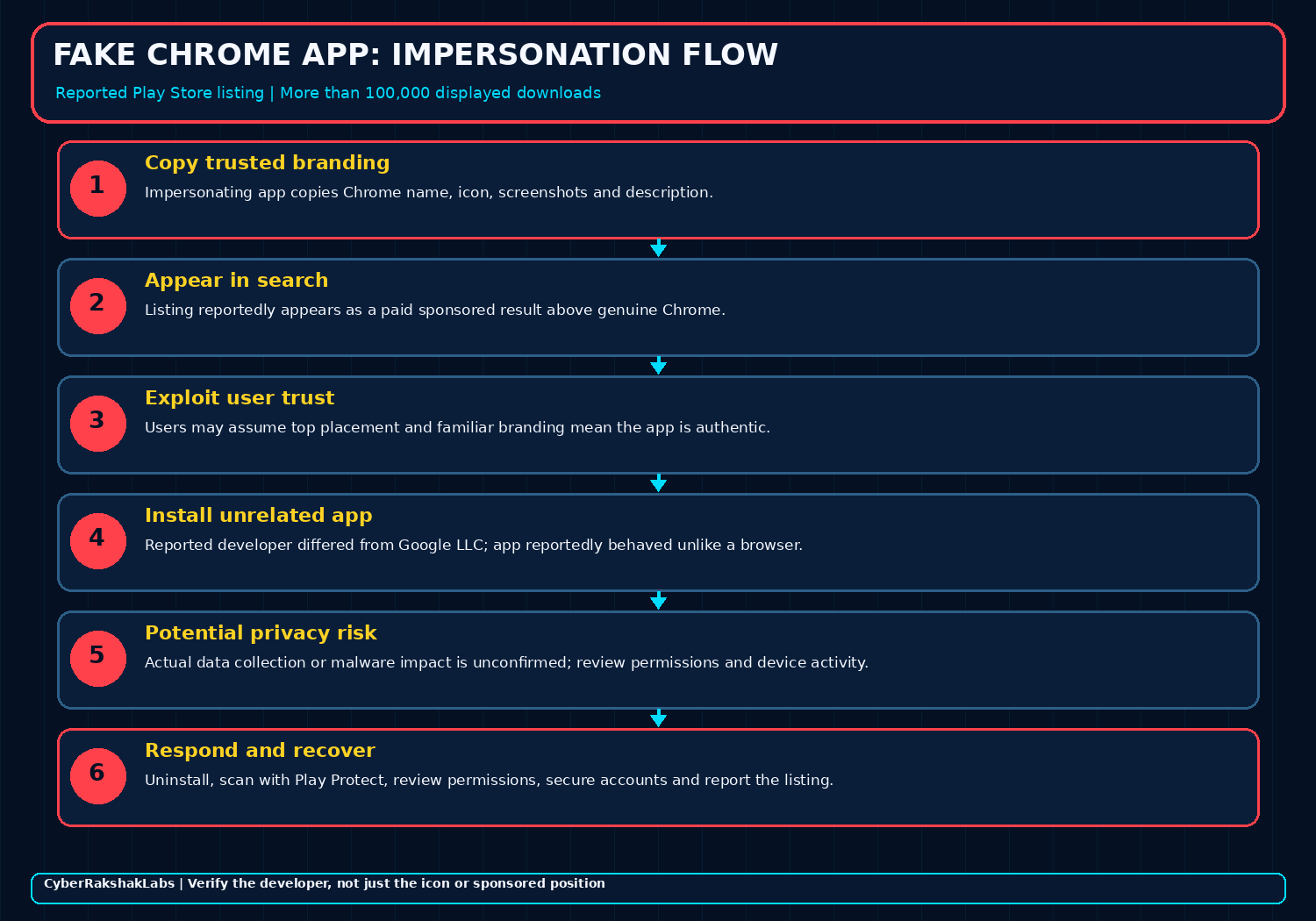
On 14 October 2026, users reportedly noticed an app presenting itself as Google Chrome among Google Play search results. The result was reportedly marked “Sponsored” and appeared above the legitimate Chrome listing. Coverage said it reused Chrome’s icon, screenshots and description while showing a developer label different from Google LLC.
Users who installed it reportedly found an unrelated contact/chat-style application with AI avatars rather than a working browser. These descriptions are user reports cited by media, not the result of independent CyberRakshakLabs malware analysis.
2. Reported Timeline — From Ball Bounce to Chrome Branding
Public coverage describes an existing Play Store listing being repurposed rather than a newly created Chrome browser.
- August 2026: Reports say the listing originally appeared as the game “Ball Bounce.”
- Late September 2026: Coverage says the same listing adopted Chrome-like branding; reports identify the package ID as
com.ballbounce.Hizbartech. - 14 October 2026: A sponsored Chrome-lookalike result was publicly flagged, prompting reporting and user complaints.
- 14–17 October 2026: Follow-up coverage described the 100,000+ displayed-download figure and examined the listing’s earlier identity.
- After complaints: Follow-up reports said Google removed the listing. Availability of any cached or indexed listing page can change and was not treated as proof that it remained installable.
The timeline is reconstructed from public reporting, not from a forensic export of Google Play’s internal listing history.
3. How the Deception Worked
The reported pattern combined identity imitation with paid visibility. Each step can make a listing look more trustworthy than its publisher identity warrants.
Reuse a listing
An existing app reportedly associated with “Ball Bounce” was renamed or rebranded.
Copy trusted assets
The listing reportedly reused Chrome’s name, icon, screenshots and store text.
Buy visibility
A sponsored result reportedly appeared above the authentic app in search.
Exploit familiarity
A user may assume that the first result or familiar icon confirms legitimacy.
4. The 100,000+ Download Figure — What It Does and Does Not Mean
The download figure needs context. Reporting links the listing to a game called “Ball Bounce” that existed before the Chrome-like rebrand. The same reported package identifier, com.ballbounce.Hizbartech, connects the later brand presentation to the earlier listing history.
What can be said
Media coverage reported that the Play Store listing displayed 100,000+ downloads. The listing reportedly reused Chrome branding and appeared as a sponsored result.
What cannot be concluded
The badge does not establish 100,000 installations after the rebrand, 100,000 unique people, 100,000 compromised devices or 100,000 cases of data theft.
Download counters can persist across an app’s history when an existing listing changes name or purpose. Unless Google provides a breakdown or a reliable telemetry source establishes the time window, the number should be described as “displayed downloads,” not as a verified count of Chrome-impersonation victims.
5. Developer Label and Attribution
Coverage identified “Hizbartech” as the developer label associated with the counterfeit listing. That label is useful for investigating the app entry, but it does not independently establish a person’s identity, location, organisational affiliation or the operator of a wider campaign.
No named criminal group is supported by the sources reviewed. Do not attribute the listing to a known malware operator or state that it was part of a broader campaign without additional evidence such as signing-certificate links, infrastructure reuse, code overlap or reliable platform records.
6. Evidence Matrix — Reported, Inferred and Unverified
| Finding | Assessment | Evidence boundary |
|---|---|---|
| Chrome-like listing appeared on Google Play | Reported by multiple outlets | Public coverage and listing screenshots describe the claim. |
| Sponsored result above genuine Chrome | Reported | Placement was visible in the shared search-result screenshot; exposure may vary by query and region. |
| 100,000+ displayed downloads | Reported | Does not establish installs after rebranding or a victim count. |
| Prior “Ball Bounce” listing / package identity | Reported by follow-up coverage | Historical listing records were not independently exported by CRL. |
| Specific malware family, C2 or stolen-data set | Not established | The sources reviewed do not provide independently verified malware analysis or a confirmed exfiltration finding. |
| All 100,000+ downloaders were compromised | Not supported | Displayed downloads are not equivalent to unique victims or verified compromise. |
7. Potential Impact — Keep Risk Separate from Confirmed Behaviour
A deceptive app can create risk even when it does not behave as advertised. Depending on what the app actually does and which permissions it obtains, risks may include unwanted advertising, tracking, privacy exposure or later social engineering. These are plausible risk categories, not confirmed findings about this app.
The supplied document and reporting reviewed do not establish a specific credential-stealing module, remote-control capability, C2 endpoint or confirmed financial loss attributable to this app. Any public statement should preserve that distinction.
8. How to Verify the Real Chrome App
com.android.chrome; the reported lookalike was linked to com.ballbounce.Hizbartech.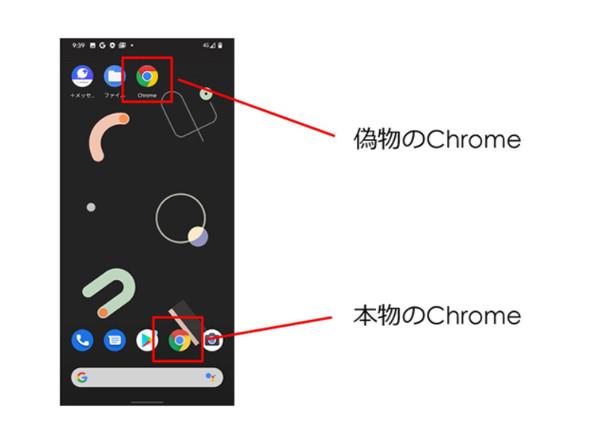
9. If the App Was Installed — Recovery Steps
- Uninstall the suspicious app. Check for a similarly named “Ball Bounce” or unfamiliar app installed around the same period.
- Run Google Play Protect and a reputable mobile-security scan, then install pending Android and app updates.
- Review app permissions, Accessibility access, device-admin apps, VPN profiles and notification access. Revoke unexpected access.
- If credentials were entered or suspicious account activity occurred, change affected passwords from a trusted device, revoke active sessions and enable MFA.
- Review payment and financial activity if payment details were provided or there are unexplained transactions.
- Preserve screenshots, app name, package ID, publisher label, approximate installation time and any available app information for reporting. Do not reinstall the app to investigate it yourself.
These are prudent recovery steps. They do not imply that every installer suffered account or financial compromise.
10. SOC and Mobile Threat Hunting Priorities
For managed Android fleets, focus first on app identity and installation inventory rather than unsupported network indicators.
- Search MDM/EMM inventories for package ID
com.ballbounce.Hizbartechand historical/current app labels such as “Ball Bounce” or a Chrome-like name. - Correlate installation and update timestamps with the reported late-September rebrand and October publicity window.
- Collect package name, signing certificate, version, installer source and permissions from any matching device before removal when incident policy allows.
- Review app behavior and requested permissions; investigate unexpected Accessibility, overlay, notification, contact, SMS or broad file access if present. Do not presume these permissions were abused in this case.
- Correlate endpoint/mobile telemetry and network events if a device shows suspicious behaviour. The sources reviewed do not publish a validated C2 indicator set for this app.
11. Organisational Defence Priorities
Prevention
Use managed application allowlists for sensitive roles, enforce Play Protect, maintain mobile OS updates and teach staff to verify developer identity.
Detection & response
Retain app inventory and install history, maintain a reporting path for suspicious store listings, and have a mobile incident-response checklist ready.
Security awareness should not stop at “only install from the official store.” Official stores reduce some risks but cannot guarantee that every listing or advertisement is authentic at every moment.
12. Sources, Verification and Research Limitations
This assessment uses the supplied CyberRakshakLabs research document plus public reporting. The original Play Store listing may be removed or changed, so current availability should not be inferred from a cached result or an old listing URL.
- Android Authority — “Google let a fake Chrome app get 100,000 downloads” (14 October 2026)
- Beebom Gadgets — fake Chrome listing reported with 100,000+ downloads (14 October 2026)
- PiunikaWeb — listing and earlier app identity reporting (14 October 2026)
- Bitdefender — fake Chrome app with 100,000+ displayed downloads (15 October 2026)
- The Times of India — follow-up coverage and download-count context (17 October 2026)
- Google Play — official Chrome listing
Public reporting is treated as source-attributed evidence. CyberRakshakLabs did not perform a binary analysis of the reported app in this research update.
13. CyberRakshakLabs Assessment — Trust the Publisher, Not the Placement
CRL Assessment: HIGH for impersonation and deceptive distribution risk. The significance is that copied branding and a paid sponsored slot reportedly placed an unrelated app ahead of the authentic browser. It exposes a gap between user assumptions about store placement and the actual identity of the publisher.
However, the current evidence does not justify calling this a confirmed information stealer, remote-access trojan or mass data-theft event. Treat the download counter carefully, verify package identity on endpoints and respond proportionately to any matching installation.
Think Before You Click. Stay Aware. Stay Secure.
CyberRakshakLabs — Threat Intelligence for a Safer Tomorrow.