
This campaign shows how a genuine ScreenConnect client can be delivered through phishing, configured to an attacker-controlled instance, and then used as a remote-access foothold.
1. Executive Summary
The security problem in this campaign is not necessarily a malicious replacement for ScreenConnect. Attackers can instead abuse the legitimate remote-management product itself: trick the victim into installing a genuine client, configure it to an attacker-controlled instance, and then use the resulting remote session as their foothold.
This creates a trust problem. A valid digital signature can tell defenders that a binary was signed by ConnectWise; it does not prove that the installation was authorized, that the configured instance belongs to the organization, or that the resulting remote session is legitimate.
For normal users, an unexpected remote-support installation should therefore be treated as a security event even when the executable is genuine and digitally signed.
2. Evidence from the Supplied Screenshot
The supplied screenshot shows a ScreenConnect ClientSetup executable and the embedded configuration used by the client. The observed parameters below are preserved from the supplied research input.
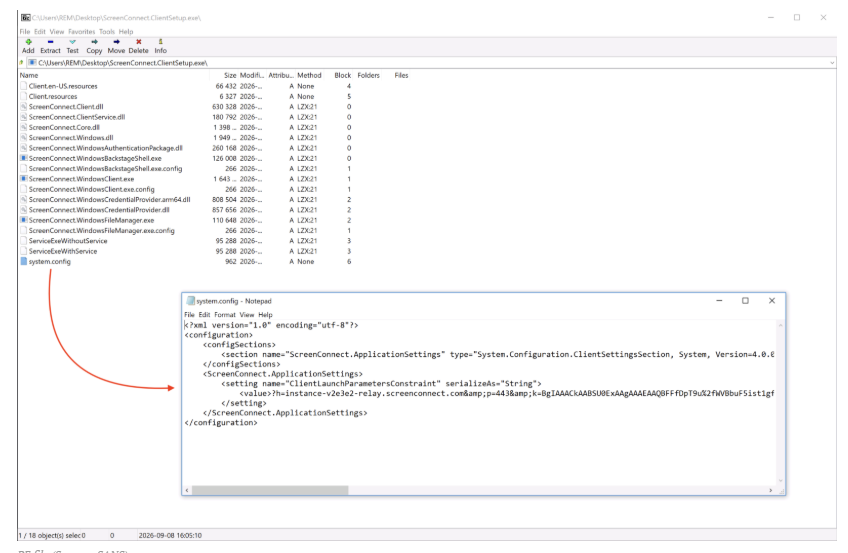
| Parameter | Observed value |
|---|---|
| Delivery URL | hxxps://thelittlecupandsaucer[.]com[.]au/ScreenConnect.ClientSetup.exe |
| Relay host | instance-v2e3e2-relay.screenconnect[.]com |
| Port | 443 |
| ScreenConnect instance ID | v2e3e2 |
| Signing entity | ConnectWise, LLC |
| Certificate authority | DigiCert G4 Code Signing CA |
| Embedded instance key | RSA-2048 public key; blob SHA-256 begins 16b1cec1 and ends 9b0ead7 |
These are source-provided indicators. Validate them against the current environment before using them for blocking or other automated response.
3. Reconstructed Attack Chain
| Phase | Activity | Security meaning |
|---|---|---|
| 1 | Phishing message/link | Victim is socially engineered. |
| 2 | Fake/misleading download | User believes remote-support software is required. |
| 3 | Genuine ScreenConnect client | Traditional malware signatures may not trigger. |
| 4 | Attacker-controlled instance/relay | Legitimate RMM becomes attacker-controlled access. |
| 5 | Remote session | Attacker can interact with the endpoint within granted privileges. |
| 6 | Post-access activity | Discovery, file access or additional tooling may follow. |
4. Why This Bypasses Traditional Thinking
The decisive signal becomes authorization context: who installed it, why, which instance it joined and what happened immediately afterward.
5. User Impact
6. Detection & Hunting
7. Remediation
ConnectWise documents two-factor authentication as an additional protection for ScreenConnect administration. The stronger organisational control is still to make software, instance, administrator and session authorisation explicit.
8. MITRE ATT&CK — Relevant Mapping
| Technique | Application |
|---|---|
| T1566 — Phishing | Reported delivery/social-engineering mechanism. |
| T1219 — Remote Access Software | Legitimate ScreenConnect is abused as the access mechanism. |
| T1204.002 — User Execution: Malicious File | Victim is induced to execute/install the client. |
| T1078 — Valid Accounts | Potential follow-on technique if valid credentials are abused; not confirmed here. |
| T1105 — Ingress Tool Transfer | Potential post-access use for additional tooling. |
9. CyberRakshakLabs Assessment
The answer is not simply to block ScreenConnect. Organizations that legitimately use RMM tools need them. The stronger control is to distinguish software legitimacy from operational legitimacy: approved software, approved instance, approved administrator, expected session and expected behavior.
This campaign illustrates why security teams should correlate RMM installation with the preceding social-engineering event and the configuration of the client itself. The signature answers “who signed the binary?”; it does not answer “who authorised this session?”
10. Sources & Verification Notes
Supplied research input: The uploaded CyberRakshakLabs brief containing the screenshot and technical parameters.
GBHackers: Attackers Abuse Legitimate ScreenConnect Client in Phishing Campaign to Gain Remote Access ↗
SANS Internet Storm Center: ScreenConnect Client (Ab)used by Attackers ↗
The technical values shown in the supplied screenshot should be validated in the relevant environment before blocklisting. This research does not claim that every ScreenConnect installation is malicious.
Recommended CyberRakshakLabs Headline
Signed ScreenConnect, Unsigned Trust: How Phishing Turns Legitimate RMM Into Remote Access
Subtitle: A genuine, digitally signed ScreenConnect client can still become an attacker’s foothold when a user is socially engineered into installing or authorizing the wrong instance.