
🚨 Fake Life Certificate Update APK: Inside a Bank-Themed Android Dropper Attack
CyberRakshakLabs | Research • Awareness • Safer Digital India
Source & social links:
LinkedIn Post ↗WhatsApp ↗YouTube ↗
A fake pension or Life Certificate update can persuade an Android user to install an application outside the normal trusted app-distribution process. In the sample examined for this research, the application used Bank of India-themed branding and a Google Play-style update screen to make the installation appear genuine. Reverse engineering identified obfuscated loader code, an embedded asset linked to a secondary APK installation workflow, and Android VPN-service functionality.
This is best understood as a bank-impersonation and social-engineering attack combined with an Android dropper/loader. The final secondary payload was not recovered as a validated installable APK in the examined sample, and successful installation of that secondary payload was not demonstrated.
Controlled testing confirmed that the app installed and launched, displayed a staged update experience, requested VPN consent, and presented a form asking for a full name, mobile number and account/PF-related number. The fields remained blank. The test did not demonstrate credential or OTP theft, submission of personal or banking information, successful VPN tunnel establishment, or confirmed data exfiltration. These limitations define what the available evidence proves.
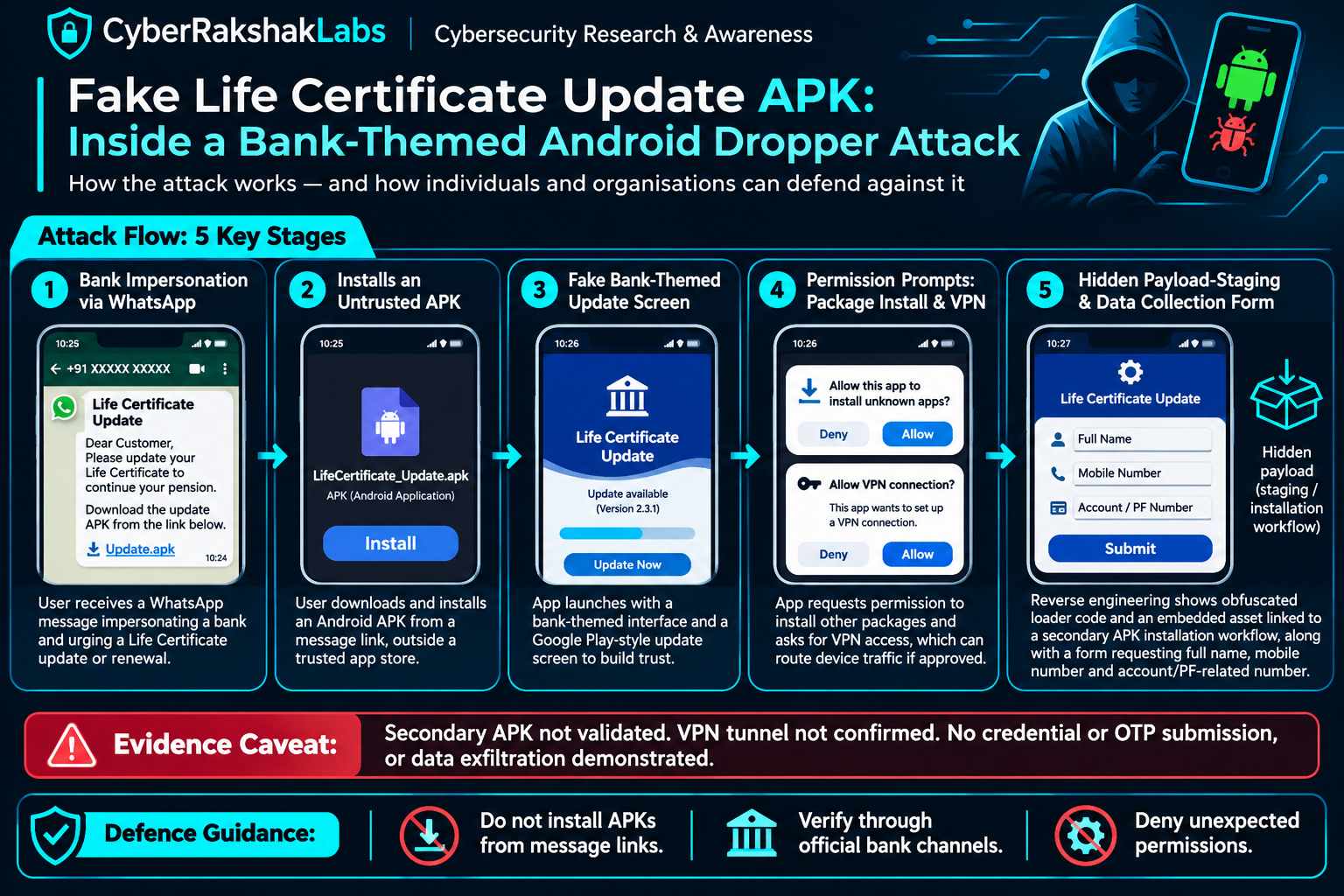
Attack Type: Social Engineering + Android Dropper
The attack combines bank/pension-service impersonation with a dropper-style Android application. The social-engineering layer abuses trust in banks, pension services and official-looking update notifications. The application carries hidden code and an embedded asset associated with preparing or installing an additional application.
A Life Certificate is a time-sensitive administrative task for many pensioners. A message claiming that an update or verification is required can create urgency and reduce careful scrutiny. The risk comes from the impersonation and delivery method—not from the genuine Life Certificate process itself.
Older users, people less familiar with Android permissions, and family members helping with pension-related tasks may be particularly exposed to this style of deception.
How the Attack Works
- Initial contact and impersonation: the victim may receive a WhatsApp message or other communication claiming to be from a bank representative, using a Life Certificate update or renewal as the reason to act.
- APK installation outside a trusted channel: the victim is persuaded to download and install an Android APK from a message link. The supplied package successfully installed on the controlled test handset.
- Fake update screen: the app displays a bank-themed Life Certificate interface and Google Play-style update presentation, including update wording and rating/review-style cues. These visual elements do not prove endorsement by a bank or Google.
- Permission prompts: the app asks for installation-related permission and displays a VPN-access request. The VPN consent prompt appeared, but successful tunnel establishment was not demonstrated.
- Hidden payload preparation: reverse engineering found obfuscated code, a recovered secondary DEX and an embedded asset. The code transforms the asset and passes bytes into a PackageInstaller-based staging workflow. The final transformation did not yield a validated APK/DEX, so the intended secondary payload remains unknown.
- Registration form: the app requests the user's full name, mobile number and account/PF-related number. The supplied recording showed blank fields; no submission was demonstrated.
- Network communication: encrypted TLS communication to a Firebase-branded hostname was observed. Application-layer content was unavailable; the endpoint was not confirmed as command-and-control, and the traffic alone does not prove data theft.
What the Sample Could Enable — and What Was Not Proven
The design creates possible risk paths depending on what the user approves and what the unresolved payload would do. If a user supplies personal or account details, that information could be exposed to the application operator. If an additional package were successfully installed, it could introduce further malicious functionality. If VPN access were granted and a tunnel established, the app could potentially route or handle network traffic within the limits of its implementation.
Evidence boundary: the test did not show a banking app being installed or launched, credentials or OTPs being entered, successful theft, financial loss, successful VPN tunnel establishment, or confirmed data exfiltration. The correct assessment is a high-risk deceptive Android dropper with a concealed payload-installation path and requested VPN capability—not proof that every possible follow-on action occurred.
How Individuals Can Protect Themselves
- Never install an APK sent through a message. Avoid Android application files received through WhatsApp, SMS, Telegram, social media, email or unknown websites—even if the sender claims to represent a bank, pension office or government department.
- Verify the request independently. For Life Certificate renewal, KYC, pension verification or an urgent bank update, contact the bank using the number on its official website, bank statement or card. Do not use contact details in the suspicious message.
- Use official application channels. Open the bank’s official website yourself or locate its verified application through the official app store. Check the developer and publisher; a familiar logo, rating or screenshot is not proof.
- Treat VPN and installation prompts as high risk. A simple Life Certificate form should not require an unknown app to install additional applications or route phone traffic through a VPN. Cancel unexpected prompts and uninstall the suspicious app.
- Do not share sensitive information. Never enter account numbers, card details, internet-banking passwords, UPI PINs, OTPs or identity details into an app reached through an unsolicited message.
- If already installed: stop interacting with the app and do not approve further prompts. If active misuse is suspected, disconnect mobile data and Wi-Fi. From a separate trusted device, contact the bank if financial information may have been exposed; change relevant passwords, revoke sessions where possible and monitor transactions.
- Preserve evidence. Keep the message, sender details, APK file and screenshots for investigation. Seek help from a trusted mobile-security professional or authorised support channel; do not forward the APK.
How Organisations Can Defend Against This Attack
A. Awareness and user education
- Train employees, pensioners, customers and support staff to recognise bank impersonation, urgent Life Certificate messages and APK attachments.
- Publish a simple rule: do not install an APK delivered through an unsolicited chat message to complete routine verification.
- Provide a verified reporting channel and encourage users to report suspicious messages and mobile applications.
B. Mobile device and application controls
- On managed Android devices, restrict installation from unknown sources where operationally appropriate.
- Allow approved applications and trusted distribution channels; apply application allowlisting and maintain an installed-package inventory.
- Use Android Enterprise controls to limit unnecessary VPN, accessibility, device-admin and package-installation privileges.
- Keep Android OS versions, security patches, Play Protect and mobile threat-defence controls current.
C. Identity and financial protection
- Require strong or phishing-resistant MFA for sensitive services; do not rely on SMS OTP as the only control for high-risk accounts.
- Use transaction alerts, payee controls, velocity checks and step-up verification for unusual financial activity.
- Train help desks and branch staff never to request passwords, UPI PINs or OTPs.
D. Detection, monitoring and response
- Monitor sideloaded/newly installed applications, unexpected package-installation events and unusual permission grants.
- Investigate unexpected VPN profiles or local VPN services, especially from apps outside the approved catalogue.
- Correlate mobile alerts with identity-provider sign-ins, account-recovery events, unusual sessions and suspicious financial transactions.
- Isolate suspected devices, preserve the APK and logs, determine which permissions/data were granted, and assess possible exposure of credentials, sessions and financial details.
- Revoke sessions and rotate credentials from a known-clean device when exposure is plausible; contact banks/payment providers promptly if financial details may have been exposed.
- Rebuild or re-enrol affected devices from a trusted baseline when integrity cannot be established. Do not assume uninstalling the visible app removes a separately installed payload.
Key Lessons for Security Teams
- A legitimate-looking interface is not a security control; visual imitation can make a malicious installation feel routine.
- APK sideloading is a critical exposure point. Restricting untrusted installation sources reduces opportunity for this delivery method.
- VPN and package-installation permission prompts deserve context because they can materially increase what an application may do.
- Assess a dropper as a staged threat: the first installed app may be only the loader, but do not assume a secondary payload was successfully deployed.
- Encrypted traffic to a cloud platform does not by itself prove command-and-control or data exfiltration.
- Public reporting should separate observed behaviour from potential impact.
If the APK Has Already Been Installed
Stop interacting with the application and do not approve further installation, VPN or other permission prompts. If you suspect active misuse, disconnect the device from mobile data and Wi-Fi. Use a separate trusted device to contact the bank if any financial information may have been exposed, change relevant passwords, revoke active sessions where possible and monitor transactions.
Preserve the original message, sender details, APK file and screenshots. Have the handset examined by a trusted mobile-security professional or authorised support channel. Do not assume uninstalling the visible application removes a separately installed payload; the supplied analysis did not validate whether that secondary installation completed.
Conclusion and Safety Message
The Life Certificate-themed Android sample demonstrates how a familiar administrative task can be turned into a mobile malware delivery opportunity. The pattern combines bank impersonation, a message-delivered APK, a fabricated update experience, permission prompts and hidden payload-staging logic. It attempts to move the user across several trust boundaries—installing an unverified app, approving additional capabilities and potentially submitting sensitive information.
Individuals should verify every banking or pension update independently and refuse unsolicited APK installations. Organisations should reduce sideloading, control application permissions, monitor mobile-device activity and prepare a response process for suspected mobile compromise.
CyberRakshakLabs Safety Message: Do not install apps from message links. Verify through official channels. Never grant permissions you do not understand.
Research Scope and Evidence Notes
This article is based on the supplied technical research document and controlled-test observations. It reports only the behaviour described in that material. The secondary APK/DEX was not validated as an installable payload; successful VPN tunnelling, credential or OTP theft, submission of personal or banking information, and data exfiltration were not demonstrated. Firebase-branded TLS communication was observed, but the endpoint was not confirmed as command-and-control infrastructure.
Source: CyberRakshakLabs, “Fake Life Certificate Update APK: Inside a Bank-Themed Android Dropper Attack,” 19 November 2026.